The Reality of Electronics Shelves at Pawn Stores
Walking into a pawn showroom to purchase home entertainment equipment can yield significant savings compared to standard retail outlets, provided you know what to check. Pawn shops handle an enormous volume of consumer electronics, ranging from budget flat screens left behind by college students to modern gaming hardware surrendered for quick cash. Because inventory shifts constantly based on local forfeitures and outright sales, the selection is rarely static from one week to the next.
Unlike dedicated big-box retailers, pawn shops acquire their merchandise from individual owners, which means every item carries its own history of use and care. Most shop brokers perform an initial function test before accepting an item into their vault, but their primary concern at intake is ensuring the device powers on and possesses clear resale value. A savvy customer understands that a brief counter check during intake does not guarantee long-term reliability without a more thorough personal inspection.
Browsing pawn shops specializing in electronics lets buyers bypass high retail markups on hardware that depreciates rapidly after unboxing. Whether you are outfitting a guest bedroom, building an arcade setup, or setting up a primary home theater, secondhand counters provide a practical venue for finding functional gear well below original MSRP, as long as you arrive prepared to test the hardware yourself.
Sourcing Inexpensive Flat Screens and Entry-Level Smart Displays
Finding an inexpensive flat-panel display is one of the most reliable purchases you can make at a pawn broker. Display inventory often accumulates quickly because televisions take up substantial floor and shelf space, prompting pawnbrokers to price them aggressively to keep inventory cycling through the showroom floor. If your goal is finding the cheapest tv options for a garage, student dorm, or workshop, pawn shops routinely display dozens of functional older LCD and LED units.
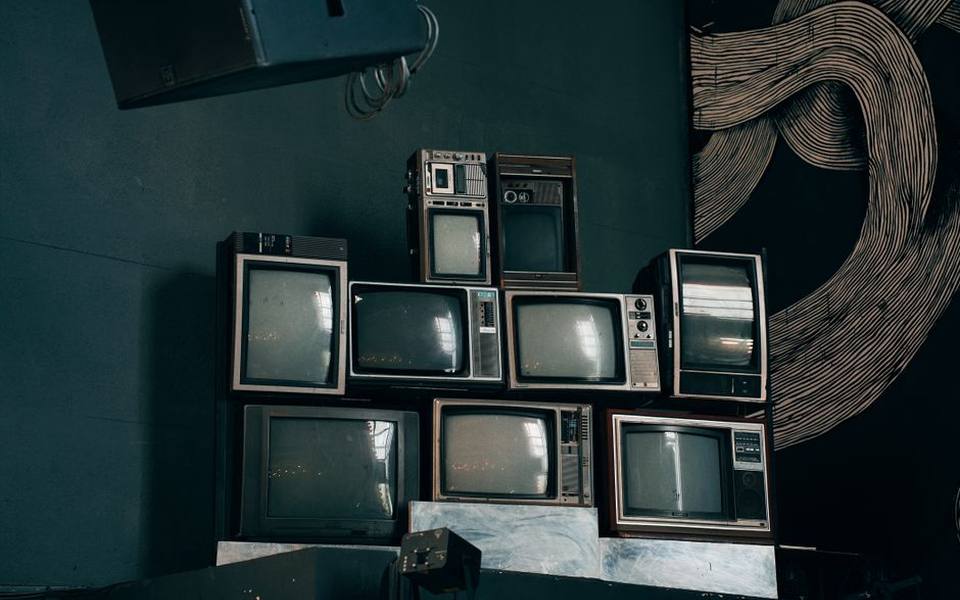
When looking for a cheap smart tv, buyers should pay close attention to the age of the operating system. Many older smart sets manufactured five to ten years ago no longer receive firmware updates, meaning built-in streaming applications like Netflix or Prime Video may refuse to launch or run sluggishly. The hardware panel itself might remain in pristine working condition, but treating the set as a simple monitor and plugging in a separate modern streaming dongle often solves the problem cleanly.
Examine the physical chassis carefully for signs of rough handling or environmental damage. Dust accumulation inside rear ventilation grills, grease residue from kitchen environments, or scuffs around mounting screw holes can reveal how the unit was treated by its prior owner. Even among inexpensive tvs for sale, you should hold out for a set with clean housing, intact factory stickers, and a legible model tag that allows you to look up exact specifications online.
Evaluating Large Panels and 65-Inch Screens
Large-format displays require extra caution because their physical size makes them particularly vulnerable to damage during transport and handling. When browsing 65 inch tvs for sale, the first detail to assess is structural integrity across the frame. Large LED panels flex easily under uneven pressure, which can cause micro-fractures in the glass substrate or separate internal diffuser sheets without leaving obvious cracks on the external plastic exterior.
Inspect the screen under ambient light while the unit is completely turned off to spot deep scratches, cleaning chemical damage, or anti-reflective coating degradation. Once powered on, view a solid bright background followed by a completely dark background to search for backlight bleeding along the bezel edges. Uneven lighting, cloudy patches across the center, or vertical banding across sports broadcasts typically indicate failing LED backlights or degraded diffuser panels that are costly to replace.
Before finalizing a purchase on a large panel, confirm how you will transport it home. Laying a modern 65-inch flat screen horizontal in the bed of a truck or trunk of an SUV places immense stress on the center of the panel, frequently shattering the internal glass over minor road bumps. Reliable shops will generally help you wrap the set in shrink film or bubble wrap, but you must keep the panel standing upright during transport.
Navigating Name-Brand Models and Streaming Platforms
Pawn shelves consistently feature well-known consumer brands, making it common to encounter numerous Samsung tvs for sale alongside competing lines from LG, Sony, and budget domestic makers. While retail stores highlight seasonal promotions and branded discounts, pawn shops determine pricing primarily by panel size, production year, and current showroom congestion. A high-end panel from two years ago might be priced lower than a newer entry-level display simply because it has sat on the shelf thirty days longer.
If you encounter promotional tags or store specials on premium brands, verify the exact model number printed on the rear manufacturer sticker rather than relying on promotional shelf cards. High-volume manufacturers often produce distinct sub-tier models for warehouse clubs that lack the local dimming zones, higher refresh rates, or advanced audio processors found on standard retail tiers. A quick online search using the full alphanumeric code clarifies whether you are looking at a premium tier or a budget-oriented variant.
For buyers interested in integrated software simplicity, Roku tvs for sale represent some of the easiest secondhand displays to configure. The Roku interface is lightweight, updates reliably across older hardware, and allows for straightforward factory resets without requiring the prior owner's active credentials. Checking for these intuitive models across regional storefronts, including pawn brokers in Texas, often yields ready-to-use family displays at a fraction of their original retail cost.
Testing Secondhand Displays on the Counter
Never purchase a television from a pawn store without requesting a live demonstration on an electrical outlet. Most shop staff will happily plug the unit in for you, but you should take testing several steps beyond watching a standard boot logo appear. Bring a high-speed HDMI cable, a small portable media device or laptop, and a USB thumb drive loaded with solid color test patterns (red, green, blue, white, and black) to inspect for stuck or dead pixels across the panel.
Physical connectivity ports require direct physical verification. HDMI ports, optical audio jacks, and coaxial connectors are prone to physical wear, cracked solder joints, or broken plastic pins from being yanked out during house moves. Plug your test cable into each HDMI port sequentially to ensure the input handshakes correctly with your source device and maintains an unbroken video signal without static or flickering lines.
Evaluate internal audio performance by cranking the volume past fifty percent during an audio test. Secondhand televisions frequently suffer from blown internal speakers characterized by harsh buzzing, rattling plastic, or distorted midrange voices caused by prior users blasting sound beyond safe limits. If the built-in speakers show signs of physical distortion, you must factor the added cost of a standalone soundbar into your overall purchase decision.
Hunting for Current-Generation PlayStation 5 Consoles
Finding a used ps5 for sale at a pawn shop has become increasingly practical as retail supply stabilizes and owners trade in systems to free up cash. Modern consoles retain healthy resale numbers, but buying pre-owned provides an opportunity to pick up bundled controllers, charging docks, or physical games at attractive package prices. However, modern connected consoles require stricter verification than older standalone systems because hardware can be restricted via network bans.

The primary risk when purchasing a modern gaming system secondhand is buying a console that has been hardware-banned from online services. Sony issues permanent hardware bans to console motherboards associated with credit card fraud, piracy, or repeated terms-of-service violations. A banned console will still boot up and play offline physical game discs, but it will permanently fail to connect to the PlayStation Network, download software updates, or run multiplayer titles.
Inspect the physical configuration of the console to verify whether you are inspecting a standard disc edition or a digital-only unit. The optical disc edition features a pronounced bulge housing the Ultra HD Blu-ray drive, while the digital model is symmetrical. Pawn tags occasionally mislabel digital editions as standard editions, so inspect the front faceplate for the physical disc slot and eject button before agreeing on a valuation.
Verifying Modern Console Hardware and Controllers
Before handing over money for a modern console, insist on connecting the machine to power and an active internet connection, using a mobile hotspot if the shop lacks guest Wi-Fi. Power on the unit and run through the initial setup menu or home screen to confirm the system reaches the dashboard smoothly. Attempting a network connection check within the settings menu immediately confirms whether the console connects to online authentication servers without displaying network restriction error codes.
Inspect thermal performance and internal cooling noise while the system runs. The cooling fans inside a healthy modern system should remain barely audible during routine menu navigation; a unit that screams loudly like a jet engine likely suffers from choked heatsink fins, pet hair clogging the power supply intake, or dried thermal interface material. While light exterior cleaning is simple, disassembling a modern console to clean an internal heatsink requires specialized Torx security screwdrivers and voids internal seals.
Examine bundled controllers thoroughly, paying close attention to analog stick drift. Analog potentiometers in modern gamepads are notoriously prone to wear, causing onscreen characters or camera angles to drift across the screen without physical input. Test every shoulder trigger, face button, and USB-C charging port to confirm that the gamepad holds a charge and pairs wirelessly without dropping connection every few seconds.
Scouring Pawn Counters for Retro and Vintage Video Games
For collectors and retro enthusiasts, pawn shops often function as an unpredictable alternative to a dedicated vintage video game shop. While boutique game stores curate their inventories meticulously and price according to recent online auction averages, pawn shops price inventory based on inventory holding time and general category interest. This makes them fertile ground for finding classic Nintendo, Sega, and original PlayStation releases mixed in alongside common sports titles.
If you want to shop retro games effectively, broaden your search beyond the primary glass showcase. While rare titles or complete-in-box collector sets are usually placed under lock and key near the registers, loose cartridges, legacy cables, and secondary accessories are frequently gathered in plastic bins beneath the main shelves. Browsing these bargain bins can turn up uncommon classic titles that retail staff mistook for common budget cartridges.
The regional character of pawn inventories varies widely across the country. Large urban centers and historic storefronts, such as licensed shops across California, often receive a steady flow of legacy gaming trade-ins from long-time residents clearing out attics or storage units. Establishing a friendly rapport with shop staff allows you to ask what vintage gaming lots might still be sitting in the back room awaiting inventory processing.
Inspecting Classic Cartridges, Discs, and Legacy Hardware
Retro media presents distinct verification challenges that differ sharply from modern optical or digital media. When evaluating vintage cartridges for older 8-bit, 16-bit, or 64-bit consoles, examine the external label for tears, sun fading, or marker ink from previous owners. More critically, inspect the cartridge housing seams for evidence of reproduction shells; high-value vintage titles are frequently counterfeited using modern reproduction circuit boards fitted into cheap modern plastic casings.
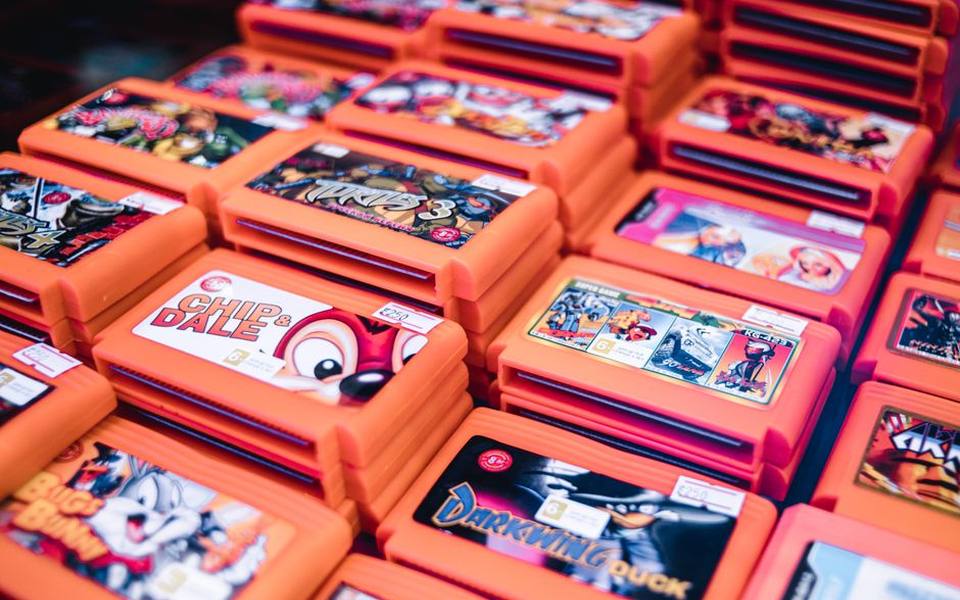
Look directly into the cartridge slot to inspect the copper edge connectors. High-grade original games feature clean, golden-copper traces without heavy pitting, corrosion, or peeling metal. A small security game-bit driver allows you to open classic cartridges to inspect the printed circuit board inside, verifying original factory microchips, correct production stamps, and the physical condition of internal save-game batteries, which typically exhaust their power reserves after fifteen to twenty years.
Optical discs from legacy platforms like the PS1, PS2, Sega Saturn, or Dreamcast require scrutiny for disc rot and surface resurfacing. Disc rot appears as tiny pinpricks of light or discolored bronze patches when the disc is held up to a bright bulb, signifying that the reflective aluminum layer inside has oxidized and rendered the disc permanently unreadable. Additionally, heavily buffed discs that were resurfaced on abrasive machines may look shiny but suffer from read errors during complex cutscenes.
Negotiating Prices and Understanding Store Guarantees
Negotiating on secondhand electronics is standard practice in almost every pawn shop, provided your offer is grounded in practical observation. If you notice minor cosmetic flaws, a missing original remote control, or scratched controller casings, point these out politely to the associate. Offering to complete a transaction immediately with cash can often secure a five to fifteen percent discount off the listed ticket price, particularly on larger displays that occupy valuable floor real estate.
Always inquire about the shop's testing policy and return window before cash changes hands. While most pawn shops sell items strictly as-is, reputable shops usually provide a brief testing window—typically twenty-four to forty-eight hours—during which you can return a defective unit for store credit or an exchange if major functional hardware defects emerge at home. Make sure the receipt clearly details the serial number and states any agreed-upon testing terms in writing.
Checking an independent directory of pawn shops helps you locate established operators with dedicated storefronts and transparent return terms. Taking the time to research shops, prepare your testing tools, and inspect ports and software firsthand ensures that your secondhand electronics purchase delivers reliable entertainment at a sensible, budget-friendly price point.
Published 2026-09-21 · reviewed with each rebuild, last October 2026.
Find pawn shops & check cashing stores near you
The directory lists 29,004 pawn shops & check cashing stores by state and city — pick your state or use the “Near me” button in the header.
More guides
-
 Money
MoneyHow to Buy Money Orders and Send Wire Transfers
-
 Money
MoneyHow to Buy and Sell Silver Bullion, Coins, and Sterling
-
 Service
Watch Battery Replacement and Sizing Guide: Costs, Links, and Services
-
 Money
MoneyWhere and How to Sell a Used iPhone for Cash Today
-
 Service
Ring Resizing Costs, Metal Limits, and Local Repair Options
-
 Buying
Where to Buy and Sell Pokemon, Sports, and Trading Cards
-
 Money
MoneyHow to Sell Gold Jewelry, Scrap Gold, and Diamonds
-
 Money
MoneyHow to Buy, Value, and Sell Used Rolex Watches
-
 Money
MoneyComplete Guide to Check Cashing Services and Fast Cash Advances
-
 Money
MoneyHow to Use In-Store Money Transfer and Foreign Currency Exchange Services
-
 Service
Guide to Custom Jewelry Design, Engraving Services, and Gold Grillz
-
 Buying
Buying Certified Refurbished MacBooks and Laptops: Pawn and Resale Guide
-
 Money
MoneyCar Title Loans and Collateral Borrowing: Complete Pawn Loan Guide
-
 Money
MoneyAuthentic Designer Handbags: How to Value, Authenticate, and Pawn Luxury Purses
-
 Money
MoneyGold and Silver Bullion Trading: Cash for Precious Metals Guide